Cheat Sheet to Compare Accounting & Payroll Services
Compare Accounting and Payroll Services With Confidence
Choose an accounting and payroll service that connects payroll, time tracking, tax filing, and bookkeeping in one workflow. For a creative business owner, the best fit should reduce manual entry, show the real cost of each pay run, and keep employee and contractor payments organized.
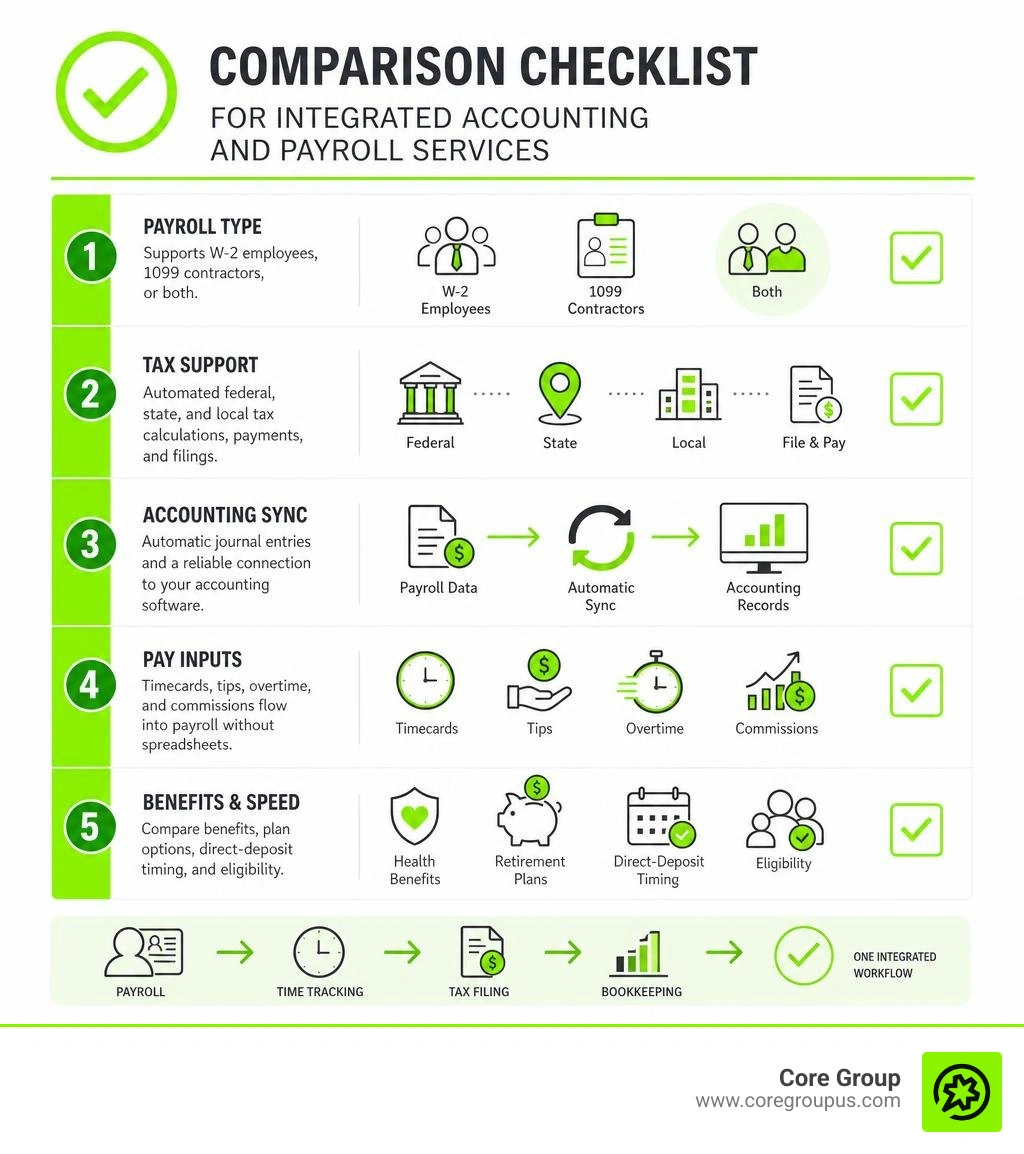
Use this quick checklist when comparing options.
- Payroll type - Confirm whether the service supports W-2 employees, 1099 contractors, or both.
- Tax support - Look for automated federal, state, and local tax calculations, payments, and filings. Multi-state teams need location-based tax handling.
- Accounting sync - Prioritize automatic journal entries and a reliable connection to tools such as QuickBooks Online.
- Pay inputs - Check whether timecards, tips, overtime, and commissions can flow into payroll without spreadsheets.
- Benefits and speed - Compare health insurance, retirement plan options, direct-deposit timing, and eligibility requirements.
The right setup gives you cleaner books, fewer payroll surprises, and better cash flow visibility. It also helps separate the work of paying people from the work of reconciling accounts, reporting profit, and planning what comes next.
I am Christian Brim, and the rest of this cheat sheet will help you weigh the features, costs, and support behind each option.
Accounting and payroll services word list:
Core Benefits of Integrated Accounting and Payroll Services
When your payroll software operates in a silo away from your general ledger, simple administrative tasks quickly multiply into major headaches. Integrated systems bridge the gap between running payroll and updating your financial records, eliminating duplicate data entry and reducing human error.
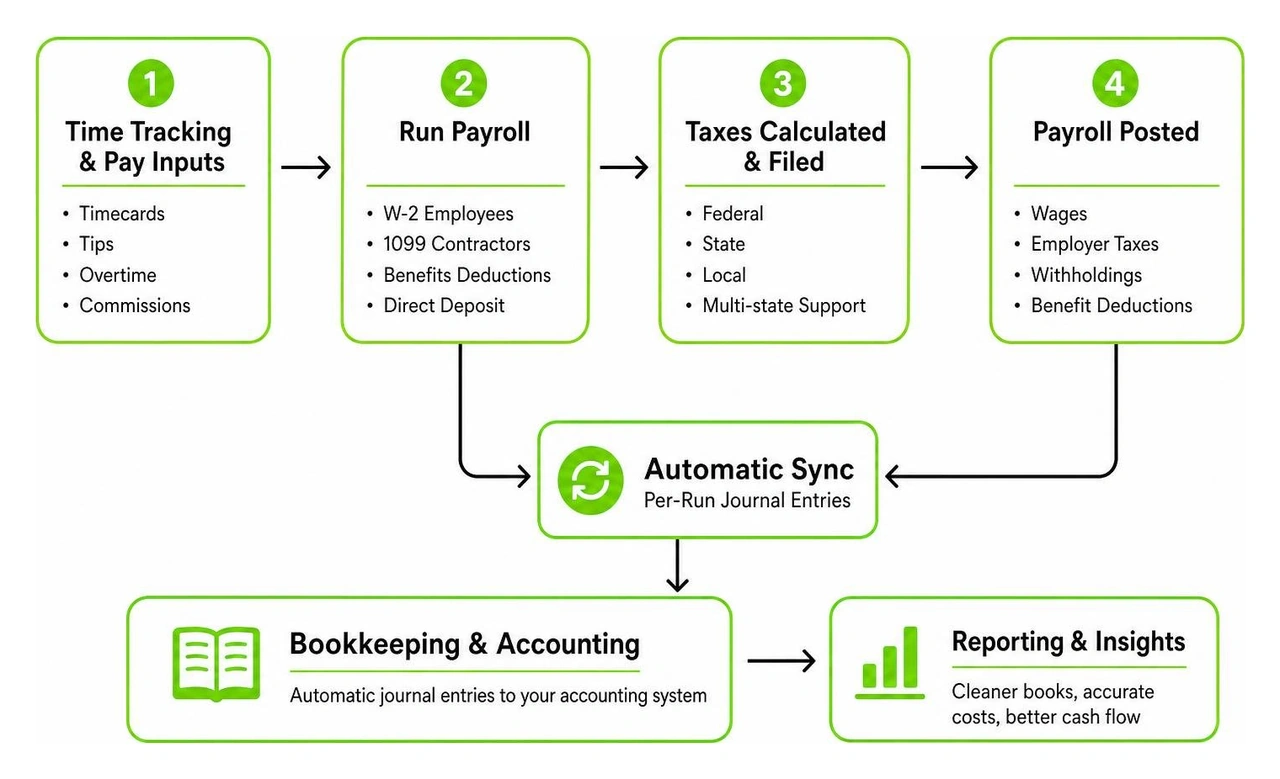
Every time you approve a pay run, an integrated solution automatically posts detailed journal entries directly to your accounting platform. Wages, employer taxes, employee withholdings, and benefit deductions land in the correct accounts instantly. You no longer have to spend hours at the end of each month untangling discrepancies or manually keying in payroll summaries.
| Feature Area | Standalone Disconnected Tools | Modern Integrated Platforms |
|---|---|---|
| General Ledger Entries | Manual monthly imports or journal entries | Automatic per-run synchronization |
| Multi-State Tax Filing | Manual filings across state agencies | Automated multi-location calculations and payments |
| Timecard and Tip Imports | Re-entering hours from external timesheets | Direct digital sync from POS or time tracking tools |
| Contractor Year-End Reporting | Manual Form 1099 compilation and mailing | Automatic electronic generation and IRS filing |
| Cash Flow Visibility | Delayed insights until manual reconciliation | Real-time expense updates across balance sheets |
Adopting an integrated workflow provides complete clarity over total labor costs. When you understand the true expenses associated with every team member, you can make smarter hiring and pricing decisions. For a deeper breakdown of these core mechanics, explore our Bookkeeping & Payroll Complete Guide.
Why Small Businesses Need Unified Accounting and Payroll Services
Creative businesses thrive when owners spend their energy innovating rather than fixing spreadsheet formulas. Unifying these functions gives you real-time visibility into your cash flow, ensuring you always know how much working capital remains after wages and payroll taxes clear.
Automated journal entries make monthly reconciliations significantly faster. Instead of combing through lines of bank statements to see why a payroll pull differed from your internal tracker, the numbers align effortlessly. Setting up seamless Payroll Integration with QuickBooks creates a rock-solid foundation for financial statements, making your balance sheet and profit-and-loss reports accurate and ready for tax planning. You can also review comprehensive Accounting Resources to optimize your overall ledger setup.
Multi State Tax Filing and Compliance Management
Managing a distributed workforce across different states is increasingly common in August 2026. However, remote teams introduce complex multi-jurisdiction compliance challenges. Every state enforces unique rules regarding withholding rates, state disability programs, and unemployment insurance.
State regulations require you to remit unemployment taxes to the specific state where the remote employee physically completes their work. Modern full-service platforms manage these requirements automatically by letting you assign specific home-office work locations to each worker.
- Automated calculation and withholding of state and local income taxes based on employee work addresses.
- Multi-state unemployment tax account registration and timely electronic tax payments.
- Reviewing regional guidelines like the Alaska Payroll Overview or specialized state-specific requirements.
- Ongoing monitoring of local tax changes to prevent unexpected tax assessment notices.
Staying on top of these requirements protects your business from expensive fines. To learn more about maintaining good standing across state lines, review our guide to Payroll Tax Compliance.
Evaluating Full Service and Contractor Only Payroll Models
Choosing the right plan depends on your team structure. Leading platforms offer flexible pricing tiers designed for either standard employees or freelance professionals.

Pricing structures generally fall into two categories. Full-service plans cost around $35 per month as a base fee plus $6 per person paid each month. Contractor-only plans eliminate the monthly base fee, charging simply $6 per person paid per month. Both models typically include unlimited pay runs each month with no long-term contracts, giving you the flexibility to scale up or pause as your business demands.
Full Service Plans for W2 Teams
Full-service payroll options take complete ownership of tax remittances and benefit administration. They calculate gross pay, subtract federal, state, and local taxes, and deposit those funds directly with tax authorities on your behalf.
Beyond basic salary disbursements, full-service tiers handle health insurance deductions, medical, dental, and vision benefit plans, and retirement plans like 401(k) setups. Partnering with seasoned Outsourced Accounting Firms ensures that your full-service software connects directly into a strategic financial plan.
Contractor Only Processing for 1099 Workers
Many creative agencies and service businesses rely heavily on freelancers, seasonal help, and specialty subcontractors. Paying these professionals does not require standard tax withholding, but it does demand clear tracking of non-employee compensation.
Contractor-only plans streamline this process. Contractors enter their own direct deposit details and tax information through a private dashboard. At the end of the year, the software compiles all payment history and automatically generates and files Form 1099-NEC with the IRS, distributing digital copies to your contractors without any manual paperwork.
Essential Operational Features to Compare
A dependable payroll engine must fit into your daily operations smoothly. The right software should capture hours accurately, process pay runs promptly, and give workers simple self-service access to paystubs and tax records.

Modern solutions allow direct point-of-sale and timecard integration. Whether tracking hourly studio time, calculating variable commission structures, or importing customer tips, digital tools eliminate manual calculations and ensure accurate payouts every single cycle.
Selecting Modern Accounting and Payroll Services for Growing Teams
Speed and flexibility make a major difference when executing payroll. Understanding processing cutoff times ensures that your team always gets paid on time without unexpected delays.
Standard Two-Day Payroll processing requires submitting payroll batches by 8 p.m. PT two business days prior to your target pay date. If you need faster turnaround, instant payment options can process funds in as little as one business day by utilizing real-time account balances. Learning the full details of these features in our Payroll Services Small Business Guide will help you pick the best timing mechanism for your cash flow rhythm. If you run a growing team, expanding into full Employee Payroll Services is the next natural step.
Employee Benefits and Onboarding Workflows
Attracting top talent requires offering comprehensive employee benefits. Modern platforms integrate benefit enrollment directly into the payroll interface, making plans easy to manage for small teams.
- Medical, dental, and vision insurance with automated pre-tax payroll deductions.
- 401(k) retirement plans with automated employer matching calculations.
- Workers' compensation policy integration that adjusts premiums automatically based on real-time payroll volume.
- Self-service digital onboarding portals where new hires complete Form W-4 and direct deposit details independently.
Managing these elements in one unified location keeps human resources organized and compliant while delivering a professional onboarding experience. For broader workforce strategies, check our overview of HR and Payroll for Small Business.
Frequently Asked Questions About Payroll and Bookkeeping
How long does payroll processing take for small businesses?
Standard processing takes two business days under standard direct deposit schedules. Business owners must submit their approved payroll batch before 8 p.m. PT to guarantee delivery on the scheduled payday. Instant payment options can reduce processing down to a single business day when backed by qualifying account balances.
What tax forms are automatically filed for contractors and employees?
Full-service payroll providers automatically handle federal and state payroll tax filings, including quarterly Form 941 filings and annual Form 940 unemployment returns. At year-end, the system generates and files Form W-2 for permanent employees and Form 1099-NEC for independent contractors who earned $600 or more during the calendar year.
How do timecards and commissions sync with payroll systems?
Integrated systems connect directly with digital timecard applications and point-of-sale platforms. Employee hours, overtime rates, tip distributions, and commission tiers sync straight into the pay run dashboard, eliminating manual data entry and recalculating gross wages automatically before submission.
Conclusion
Running payroll and keeping clean books should never steal time away from growing your creative business. The right system eliminates data entry headaches, keeps state tax agencies satisfied, and gives you crystal-clear insight into your bottom line.
At Core Group, we help creative entrepreneurs move beyond basic software tools. With our no-fluff, profit-first playbook, we deliver complete financial management, reliable bookkeeping, and proactive tax strategy. We take administrative burdens off your plate so you can focus entirely on your craft, backed by our peace-of-mind MacBook Pro guarantee. Explore our complete small business payroll guide to see how our team can transform your back office into a high-performance engine for growth.