Taxing Times: A Self-Employment Tax Guide for YouTubers
What YouTubers Need to Know About Self Employment Tax
YouTube self employment tax is one of the biggest surprises new creators face when their channel starts earning money. Unlike a regular job, YouTube does not withhold any taxes from your payments. That means you are responsible for calculating and paying them yourself.
Here is a quick overview of how it works.
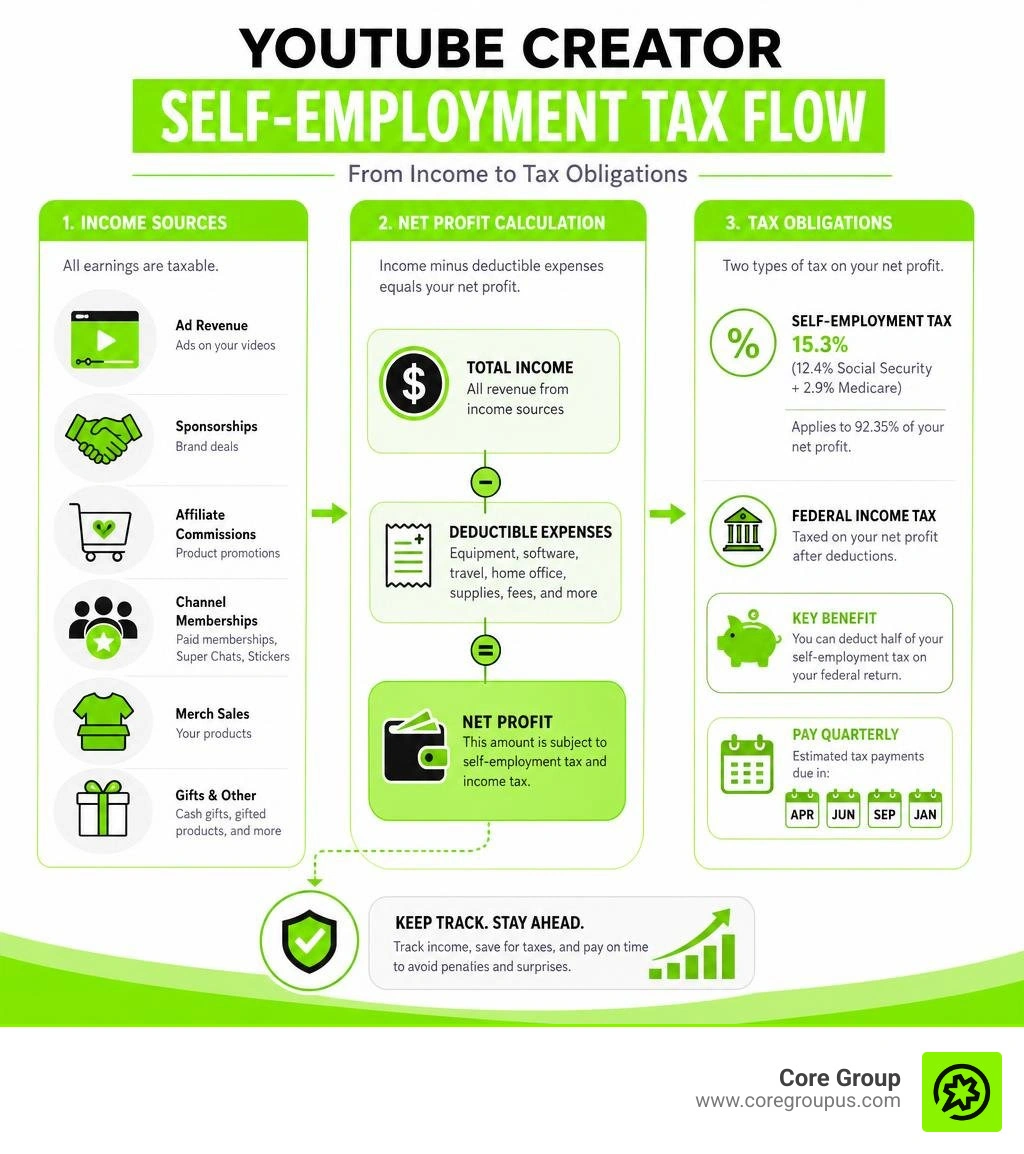
- Who owes it - Any creator with $400 or more in net YouTube earnings per year
- The rate - 15.3% (12.4% Social Security + 2.9% Medicare) applied to 92.35% of your net earnings
- What income counts - AdSense, sponsorships, affiliate commissions, memberships, merch, and even gifted products
- Key forms - Schedule C, Schedule SE, and Form 1040
- When to pay - Quarterly, with deadlines in April, June, September, and January
- A big perk - You can deduct half of your self-employment tax on your federal return
On top of self-employment tax, you also owe regular federal income tax on your net profit. Together, these can easily add up to 30-35% or more of everything you earn.
Many creators only discover this at tax time, when the bill is already waiting. A creator on TikTok, for example, reportedly owed over $9,000 to the IRS after not filing for three years. YouTube creators face the same risk.
This guide breaks down every part of the process so you know exactly what you owe, what you can deduct, and how to stay ahead of it.
What Counts as Taxable Income for Content Creators
When you start making money from your videos, the IRS views you as a business owner. This means that almost every dollar coming into your channel is considered taxable income. Many new creators assume that only their direct Google AdSense payouts are taxable, but the reality is much broader.
To stay compliant, you must track and report multiple revenue streams. These streams include your AdSense revenue, which is the money you earn from ads running on your videos. It also includes channel memberships, Super Chats, and Super Stickers, which are all processed through the YouTube platform.
Sponsorships and brand deals are another major source of income. Whether a brand pays you to do a dedicated video or a quick thirty-second shoutout, that money is fully taxable. The same rule applies to affiliate commissions. If your viewers click a link in your description to buy a product and you get a percentage of the sale, you must report those earnings.
Merchandise sales are also taxable. If you sell t-shirts, mugs, or digital products through platforms linked to your channel, the profit is part of your business income.
Gifted products are a common trap for creators. If a company sends you a camera, a phone, or a pair of shoes in exchange for a review or a feature in your video, the fair market value of that product is considered taxable income. The IRS treats this as barter compensation. You can read more about how these different streams are handled in our guide on Taxes for Influencers.
Business versus Hobby Classification
One of the first things we must establish is whether the IRS views your YouTube channel as a business or a hobby. This classification changes how you file and what you can deduct.
To be considered a business, you must demonstrate a clear profit motive. The IRS looks at several factors to determine this. They want to know if you carry out the activity in a businesslike manner, maintain accurate books, and depend on the income for your livelihood. They also look at whether you have made a profit in at least three of the last five years.
If your channel is classified as a business, you report your income and expenses on Schedule C. This allows you to deduct your business expenses from your gross income, which lowers your taxable net profit.
If the IRS classifies your channel as a hobby, the rules are much less favorable. Under current tax laws, hobbyists must report all of their income, but they are not allowed to deduct any hobby expenses. This means you would pay tax on your gross revenue without being able to write off the cost of your camera, editing software, or internet. Keeping clear records and operating with a professional approach is the best way to prove your business status.
Understanding the YouTube Self Employment Tax and How It Works
Self-employment tax is the way independent business owners contribute to Social Security and Medicare. When you work a normal W-2 job, your employer pays half of these taxes and you pay the other half through automatic payroll deductions.
When you work for yourself, you are both the employer and the employee. This means you must pay both portions. The total self-employment tax rate is 15.3 percent. This is broken down into 12.4 percent for Social Security and 2.9 percent for Medicare.
The tax is not calculated on your gross revenue. Instead, it is calculated on 92.35 percent of your net earnings from self-employment. Your net earnings are what you have left after subtracting your business deductions from your total income. You can learn more about this process by watching this helpful video on Self Employment Tax, Explained.

Who Must Pay the YouTube Self Employment Tax
You must pay self-employment tax if your net earnings from self-employment reach or exceed the 400 dollar threshold for the year. Even if your YouTube channel is a side hustle and you have a regular day job, you still owe this tax on your creator earnings if you cross that 400 dollar mark.
If you have not registered your business as an LLC or a corporation, the IRS treats you as a sole proprietor by default. As a sole proprietor, all of your net channel earnings flow directly to your personal tax return, and you will calculate your self-employment tax using Schedule SE. For a deeper understanding of how these rules apply to independent creators, you can watch this video on Understanding Self-Employment Tax.
How to Calculate Your YouTube Self Employment Tax Liability
Calculating your tax liability involves understanding the annual limits set by the IRS. The Social Security portion of the self-employment tax only applies up to a certain level of earnings each year.
For the 2025 tax year, the Social Security wage limit is 176,100 dollars. For the 2026 tax year, this limit increases to 184,500 dollars. Any net self-employment earnings you make above these limits are only subject to the 2.9 percent Medicare portion of the tax.
High-earning creators should also be aware of the additional Medicare surtax. An additional 0.9 percent Medicare tax applies to self-employment income that exceeds 200,000 dollars for single filers or 250,000 dollars for married couples filing jointly.
The good news is that the IRS allows you to take an above-the-line deduction for 50 percent of your self-employment tax. This deduction reduces your adjusted gross income, which lowers the amount of federal income tax you owe. It is a valuable tool that helps offset the burden of paying both the employer and employee portions of the tax. Proper preparation is key, and you can explore more strategies in our article on Tax Planning for Freelancers.
Tax Deductions and Write Offs to Lower Your Bill
The most effective way to reduce your youtube self employment tax is to claim all of your legitimate business deductions. Every dollar you write off reduces your net profit, which directly lowers both your self-employment tax and your income tax.
The IRS allows you to deduct expenses that are ordinary and necessary for your business. An ordinary expense is one that is common and accepted in your industry. A necessary expense is one that is helpful and appropriate for your trade.
For large equipment purchases, you can use Section 179 expensing to deduct the entire cost of the item in the year you bought it, rather than depreciating it over several years. If you use an item for both personal and business tasks, you can only deduct the business use percentage. For example, if you use a computer 80 percent of the time for editing videos and 20 percent of the time for personal gaming, you can write off 80 percent of its cost. You can find a detailed list of what you can claim in our guide on Tax Deductible Expenses for Influencers.
Equipment and Home Office Deductions
As a video creator, your gear is your biggest investment. Fortunately, most of the physical tools you need to produce content are tax-deductible. This includes cameras, lenses, tripods, microphones, lighting setups, and the computers you use for editing.
Your workspace can also provide a significant tax break through the home office deduction. To qualify, you must use a specific area of your home exclusively and regularly for your YouTube business. If you film in your living room or edit on your couch, that space does not qualify because it is also used for personal activities. However, if you have a dedicated room that serves as your studio or editing office, you can claim it.
You can calculate this deduction using two different methods. The simplified method allows you to claim 5 dollars per square foot of your dedicated space, up to a maximum of 300 square feet, resulting in a 1,500 dollar deduction. The actual expense method requires you to calculate the actual costs of running your home, including rent, mortgage interest, utilities, and insurance, and then deduct the percentage of those costs that matches the square footage of your office. For a comprehensive list of what creators can write off, check out the 15 Common Tax Deductions for YouTube Creators (2026 List).
Software and Professional Services
The digital tools you use to run your channel are also fully deductible. This includes monthly or annual subscriptions for video editing software, graphic design platforms, royalty-free music libraries, and stock footage sites. You can also write off digital storage fees, website hosting, and domain registration costs.
As your channel grows, you might need to hire external help. Fees paid to independent contractors, such as editors, thumbnail designers, scriptwriters, and voiceover artists, are deductible business expenses.
Professional services that keep your business running smoothly are also write-offs. This includes legal fees for reviewing brand contracts and the cost of professional bookkeeping. Keeping your books organized is vital for maximizing these deductions, and you can learn how to build a strong system with our resources on Bookkeeping for YouTubers.
Quarterly Estimated Payments and Tax Forms
Since YouTube does not withhold taxes from your monthly payouts, the IRS expects you to pay your taxes throughout the year. If you expect to owe 1,000 dollars or more in federal taxes for the year, you must make quarterly estimated tax payments.
If you skip these payments and try to pay everything when you file in April, you could face underpayment penalties and interest. To avoid these penalties, you can rely on safe harbor rules. The IRS will not penalize you if you pay at least 90 percent of your current-year tax liability or 100 percent of the tax shown on your return from the previous year. If your adjusted gross income for the previous year was over 150,000 dollars, you must pay 110 percent of that prior-year tax to meet the safe harbor.
For the 2026 tax year, the quarterly payment deadlines are April 15, June 15, September 15, and January 15 of the following year. Planning for these payments is a critical part of running a stable business, and we explain how to navigate this in our article on As a Freelancer How Do I Plan for Taxes.

Essential Tax Forms for YouTubers
Filing your taxes as a creator requires a specific set of forms. The main document you will use to report your business activity is Schedule C, which is filed alongside your standard Form 1040. On Schedule C, you will list your gross revenue and itemize your business deductions to calculate your net profit.
Once you have determined your net profit, you will use Schedule SE to calculate your self-employment tax. This amount is then transferred to the appropriate section of Form 1040. If you are making estimated payments throughout the year, you will use Form 1040-ES to calculate and submit those vouchers.
You will also receive several forms from the companies that pay you. Google AdSense will send you a Form 1099-MISC or a Form 1099-NEC if your earnings exceed the reporting thresholds. Third-party payment processors, like those used to handle merchandise sales or fan donations, may send you a Form 1099-K. Even if you do not receive these forms, you are still legally required to report every dollar of income you earned.
Depending on where you live, you must also comply with state tax requirements. Different states have unique rules for business filing and income reporting. For example, you can research local requirements through resources like the Video Library | Department of Revenue - Taxation - Colorado Taxes or look into the Connecticut Income Tax Review - April 2, 2025 - YouTube to see how regional rules are handled. You can also review state-specific business income tax processes through guides such as Business Income Tax - My Alabama Taxes.
Advanced Tax Strategies and Business Structures
As your channel grows and your revenue increases, operating as a default sole proprietor might not be the most tax-efficient option. Many creators choose to form a Limited Liability Company, which provides personal asset protection.
Once your channel is earning a consistent net profit, usually around 50,000 to 80,000 dollars per year, you might want to consider electing S Corporation status for your LLC. An S Corp election can significantly reduce your self-employment tax.
Under an S Corp structure, you become an employee of your own business. You pay yourself a reasonable salary, which is subject to standard payroll taxes. The remaining profit can be distributed to you as shareholder distributions, which are not subject to self-employment tax. This strategy requires careful planning and compliance, but it can save you thousands of dollars. You can read more about this in our guide on Single Member LLC Taxes and watch this detailed legal explanation on How to Pay Taxes on an LLC | Mesa Small Business Lawyer.
Additionally, most creators qualify for the Qualified Business Income deduction. This deduction allows eligible self-employed individuals to deduct up to 20 percent of their qualified business income from their taxable income, subject to certain income thresholds. We break down how this works in our article on the QBI Deduction Explained.
Frequently Asked Questions About Creator Taxes
Navigating creator taxes can be confusing, and we hear many of the same questions every week. Here are answers to some of the most common issues YouTubers face.
Do I owe taxes if I made less than 600 dollars
Yes, you do. There is a common myth that you only owe taxes if you earn more than 600 dollars, because that is the threshold for companies to send you a Form 1099. However, the IRS requires you to report all income, regardless of the amount or whether you received a form.
If your net earnings from self-employment are 400 dollars or more, you must file a tax return and pay self-employment tax. Even if you made less than 400 dollars, you still must report that income on your federal income tax return if you have other filing requirements.
How do I handle international viewer revenue and foreign withholding
If you are a US creator, you must report all of your global income, including earnings generated by international viewers. If you are a non-US creator earning money from viewers inside the United States, Google may withhold up to 30 percent of those earnings for US taxes.
To avoid excessive withholding, non-US creators must submit a Form W-8BEN through their Google AdSense account. This form allows you to claim tax treaty benefits between your home country and the United States, which can lower or eliminate the withholding rate. If you do pay foreign taxes on your international earnings, you may be able to claim the Foreign Tax Credit using Form 1116 to avoid double taxation.
Can I deduct products purchased for review videos
You can deduct products bought specifically for review videos, but you must apply the ordinary and necessary test. The purchase must have a clear business purpose.
If you buy a phone, review it on your channel, and then use it as your personal phone, you can only deduct the business-use percentage of that purchase. If you sell the product after reviewing it, the money you receive from the sale must be reported as business income, which offsets the original deduction. Keeping detailed logs of how these products are used is the best way to support your deductions.
Conclusion
Managing your taxes as a YouTuber does not have to be an overwhelming chore. By understanding what counts as income, tracking your deductible expenses, and staying on top of your quarterly estimated payments, you can avoid surprise bills and keep more of your hard-earned money.
At Core Group, we provide expert financial management, bookkeeping, and tax services designed specifically for creative entrepreneurs. We offer a no-fluff, profit-first playbook that guarantees peace of mind and saves you valuable time, allowing you to focus on creating great content. We back our services with our unique MacBook Pro guarantee.
If you are ready to take the stress out of your tax planning and optimize your business structure, we are here to help. Get started today by visiting our Core Group Content Creator Services page.