Payroll for Micro Businesses: Services, Software, and Sanity
Legal Requirements for Micro Business Payroll
Micro business payroll is the process of paying employees or yourself as a business owner when your team has 10 or fewer people, and it comes with the same legal obligations as any larger company.
Here is what you need to know right away.
- Who needs it - Any micro business with at least one W-2 employee must run payroll and withhold taxes
- What it costs - Most paid software runs $6 per person per month plus a base fee around $35-$49/month; free options exist for teams under 10
- Key tax forms - You will deal with W-4s, 941s, 940s, W-2s, and 1099s depending on how you pay people
- Paying yourself - Sole proprietors and LLCs can take an owner's draw; S-Corp owners must pay themselves a W-2 salary
- Biggest risk - Payroll errors and missed tax deposits can trigger IRS penalties starting at 2% and climbing fast
Running a small creative business is already a full-time job. Add payroll to the mix and it can feel like a second one.
You are probably great at your craft. Spreadsheets full of tax withholding tables? Not so much. That is completely normal for a creative entrepreneur juggling client work, invoices, and now the reality of paying people correctly and on time.
The stakes are real. The IRS does not make exceptions for small teams. A single missed deposit or misclassified contractor can mean penalties, back taxes, and hours of stress you simply cannot afford.
The good news is that in 2026, micro businesses have more options than ever, from free tools for tiny teams to full-service software that handles nearly everything automatically.
This guide will walk you through all of it, clearly and without the jargon.
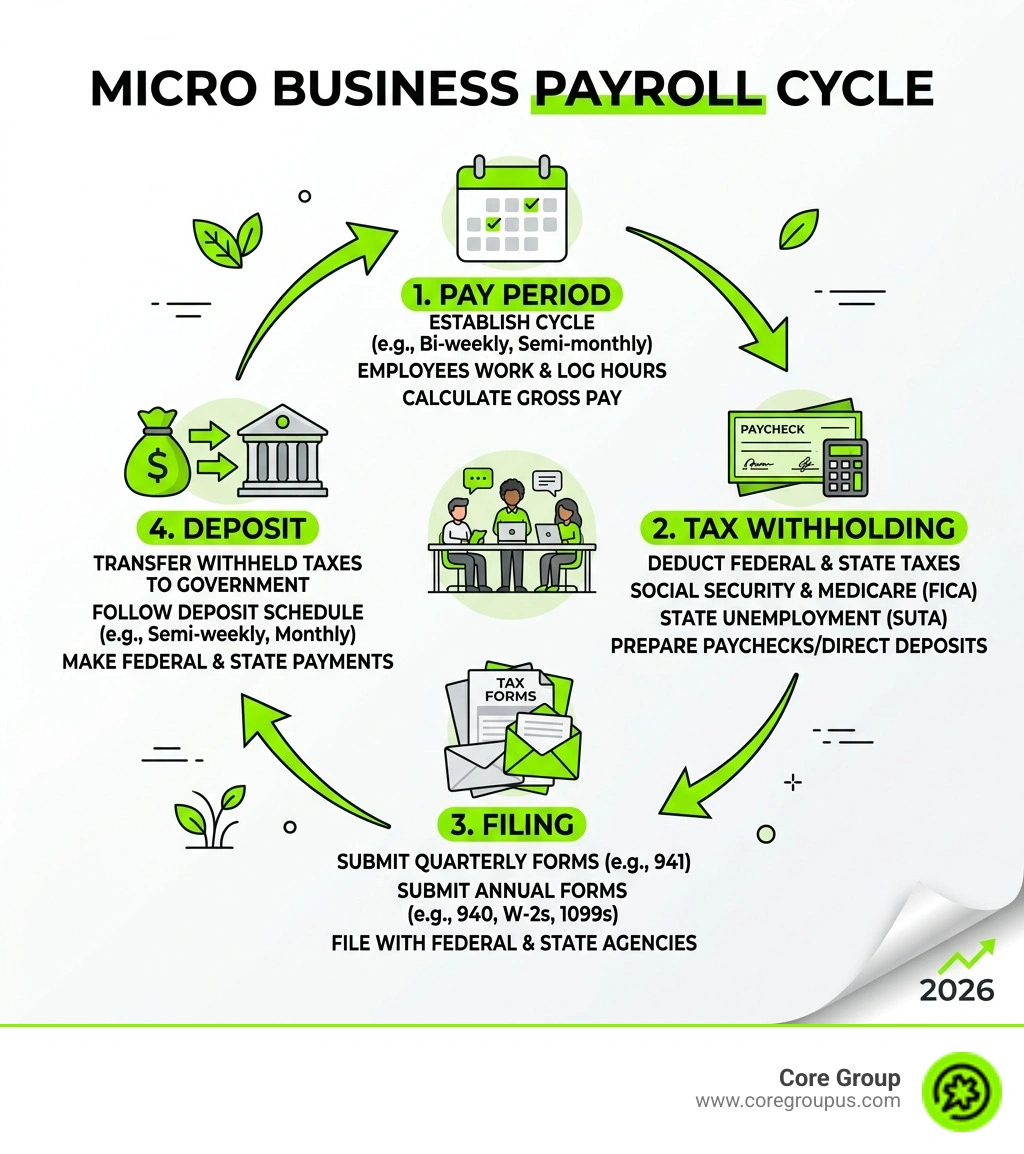
Micro business payroll helpful reading.
Entering micro business payroll means moving from a simple one person operation to a formal employer. Even if you only have one part time assistant, the government views you as a regulated entity with specific responsibilities.
The first step for any micro business is obtaining an Employer Identification Number or EIN. This is like a social security number for your business and is required for reporting taxes to the IRS. You cannot skip this step if you plan to hire W-2 employees.
Once you have your EIN, you must collect specific documents from every new hire. The W-4 form tells you how much federal income tax to withhold from an employee's paycheck. The I-9 form verifies that the person is legally allowed to work in the United States. Keeping these on file is not just a good habit, it is a legal necessity.

Your primary obligation as an employer is tax withholding. This includes federal income tax, Social Security, and Medicare. You are also responsible for paying the employer's share of FICA taxes and the Federal Unemployment Tax or FUTA. These funds must be deposited on a strict schedule, usually monthly or semi-weekly depending on your total tax liability.
Compliance does not stop at the federal level. Every state in our service area, from Alabama to Wyoming, has its own rules for new hire reporting. You must notify the state within a certain number of days whenever you hire someone. This helps the government track child support obligations and prevent unemployment fraud. Failing to report new hires can lead to annoying fines that eat into your creative budget.
To stay on the right side of the law, you should review a guide on Payroll Tax Compliance. It covers the nuances of staying current with ever-changing 2026 regulations.
Comparing Manual Methods and Automated Software
Many creative entrepreneurs start by trying to calculate payroll by hand. They think it will save money. While the software subscription fee stays in your pocket, the cost in time and risk is often much higher.
Manual payroll involves using IRS tax tables to calculate withholdings for every single check. You have to track year to date totals, manage deductions for benefits, and remember exactly when every tax form is due. One small math error can lead to an underpayment, which triggers IRS interest and penalties.
| Feature | Manual Processing | Automated Software |
|---|---|---|
| Time Spent | 4 to 7 hours per month | 15 minutes per run |
| Error Risk | High (manual entry) | Low (automated math) |
| Tax Filing | You must do it | Done for you |
| Compliance | Your responsibility | Auto-updates for 2026 |
| Cost | $0 (plus your time) | $40 to $80 per month |
The risk of penalties is a major factor. If you are just one day late on a tax deposit, the IRS can charge a 2% penalty. If you are more than 16 days late, that jumps to 10%. For a micro business with tight margins, these fees are a direct hit to your profitability.
Using Small Business Payroll Software moves the burden of accuracy from your shoulders to a digital system. These platforms update automatically whenever tax laws change. They also handle data security, ensuring that sensitive employee information like social security numbers and bank details are encrypted and protected from hackers.
Essential Features and Setup for New Systems
When you choose a system for micro business payroll, you want a platform that does the heavy lifting so you can get back to your creative work. A good dashboard should give you a clear view of upcoming pay dates and tax liabilities at a glance.
Essential features for a micro team include direct deposit and 1099 contractor support. Many creatives work with a mix of regular employees and freelancers. Having one system that can pay both is a huge time saver. You also want a provider that offers multi state filing if you have team members working remotely in different states.
Another vital feature is the employee self service portal. This allows your team to download their own pay stubs and W-2 forms without emailing you every time they need a document for a loan or apartment application. It keeps your inbox clean and empowers your team. You can learn more about how these tools work together in this article on Hr And Payroll For Small Business.
Integrating Time Tracking with Micro Business Payroll
If you pay people by the hour, manual timecards are a nightmare. Modern software allows you to integrate digital timesheets directly with your payroll run. This means you do not have to type hours into a spreadsheet. The system pulls the data, calculates regular pay and any overtime, and prepares the check automatically.
This integration is especially helpful for staying compliant with overtime laws. In 2026, tracking "qualified overtime premium pay" is essential for certain tax credits. Software makes this tracking seamless, ensuring your records are audit-ready.
Steps to Launch Your First Pay Run
Setting up your first run takes a bit of preparation but pays off in the long run. First, you will need to connect your business bank account so the software can pull funds for paychecks and taxes. You will also need to establish a pay schedule, such as every Friday or the 1st and 15th of the month.
If you are switching mid-year, you must enter opening balances. This includes all the wages you have already paid and the taxes you have already withheld for the current year. This ensures your end of year W-2 forms are accurate. Finally, you will onboard your employees by having them enter their personal details and banking info directly into the system.
Frequently Asked Questions
Common Challenges in Micro Business Payroll Management
The biggest challenge for micro businesses is often "tax deadline amnesia." It is easy to get caught up in a project and forget that a quarterly filing is due. Automated systems solve this by sending alerts or simply filing the forms on your behalf.
Another risk is contractor misclassification. The IRS is very strict about who counts as a 1099 contractor versus a W-2 employee. If you control when, where, and how someone works, they are likely an employee. Misclassifying them to save on taxes can lead to massive back-tax bills and legal trouble.
Can I handle payroll manually for just one employee
You technically can, but we usually advise against it. Even for one person, you are responsible for federal, state, and local withholdings, unemployment insurance, and year-end reporting. The time you spend doing this manually is time you are not spending on billable client work. When you factor in your hourly worth, a $40 monthly software fee is almost always the cheaper option.
How do I pay myself as a micro business owner
This depends on your business structure. If you are a sole proprietor or a single member LLC, you typically take an "owner's draw." This is not a formal paycheck and no taxes are withheld at the time of the draw. You pay your taxes through quarterly estimated payments.
However, if your business is an S-Corp, the IRS requires you to be a W-2 employee. You must pay yourself a "reasonable compensation" via a regular payroll run with all standard taxes withheld. This is a common area where the IRS conducts audits, so getting the salary amount right is critical for your sanity.
Conclusion
Managing micro business payroll does not have to be a source of constant anxiety. By moving away from manual spreadsheets and embracing automated tools, you can ensure your team is paid accurately while protecting your business from costly IRS penalties.
At Core Group, we understand that creative entrepreneurs want to spend their time creating, not calculating tax withholdings. Our financial management and bookkeeping services are designed specifically for people like you. We use a no-fluff, profit-first playbook that guarantees peace of mind and saves you hours every week.
We are so confident in our ability to streamline your back office that we offer a MacBook Pro guarantee. If we cannot help you find more time and profit in your business, we will make it right. Whether you are in Alabama, California, or anywhere else in our service areas, we are here to help you regain your sanity.
If you are ready to stop worrying about tax deadlines and start focusing on your next big project, reach out to us for more info about our payroll and financial services. Let us handle the numbers so you can handle the art.