A Comprehensive Guide to Evaluating QuickBooks Payroll Integration Options
Connect Payroll Integration with QuickBooks for Clearer Books
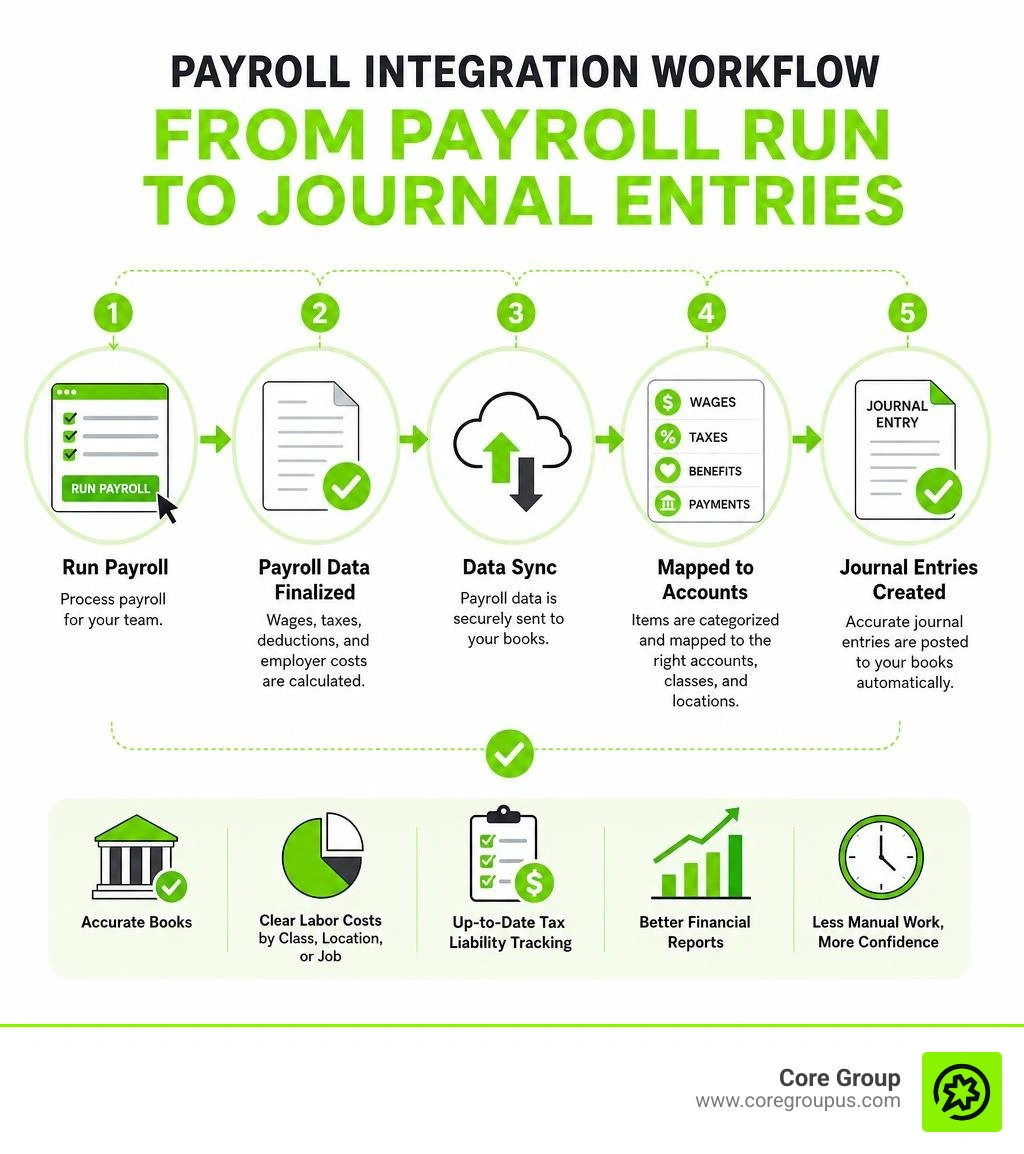
Payroll integration with QuickBooks connects your payroll system to your QuickBooks Online books so wages, taxes, benefits, and payroll payments can flow into the right accounts automatically.
For a creative business owner, that means less time rebuilding payroll reports in spreadsheets and less uncertainty about what labor really costs each project, client, or department.
A typical connection can help QuickBooks record
- Gross wage expense
- Employee tax withholdings and deductions
- Employer payroll taxes and benefit costs
- Net pay and payroll cash withdrawals
- Labor costs by class, location, or job when configured correctly
The right setup does not replace review. It gives you a cleaner starting point for bank reconciliation, tax liability tracking, and financial reports you can trust. The key is choosing a payroll option that fits your team, tax footprint, reporting needs, and chart of accounts.
I am Christian Brim, and I help creative entrepreneurs turn financial systems into useful tools rather than another source of stress.
Handy payroll integration with QuickBooks terms
Key Benefits of Payroll Integration with QuickBooks
Running payroll manually and then keying every line item into your accounting ledger is a recipe for late nights and double-entry headache. When you sync your standalone payroll processor directly with QuickBooks Online, your financial management shifts from tedious backwards record-keeping to clear, forward-looking strategy.
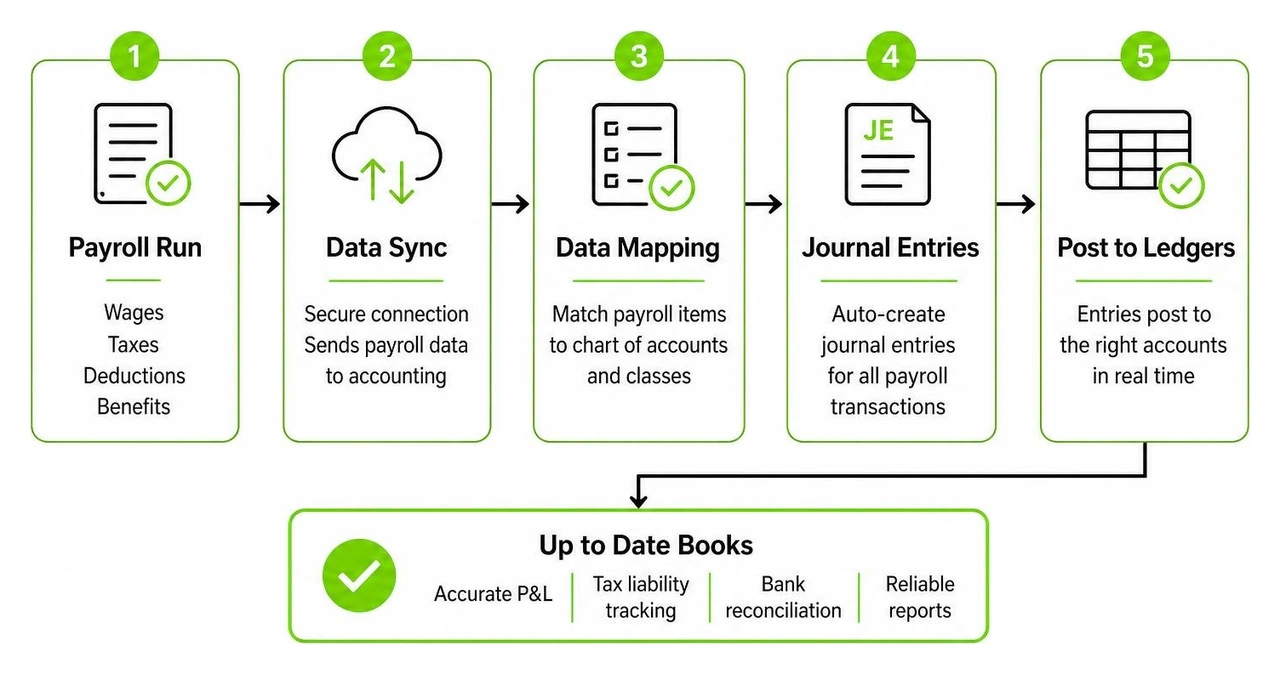
The primary advantage of implementing a payroll integration with QuickBooks is total accuracy in your profit and loss statements. Without direct sync, business owners often post total lump-sum cash withdrawals to a generic payroll expense account. That practice obscures critical distinctions between actual employee wages, employer-funded taxes, health insurance subsidies, and employee-funded retirement withholdings.
By automating journal entry creation, every dollar lands in its proper general ledger bucket automatically. You can review full insights in our Bookkeeping Payroll Complete Guide 2026.
Here are the central operational benefits we see when creative studios and growing businesses automate this workflow
- Eliminates manual typing errors across earnings codes, withholding tax categories, and benefit line items
- Speeds up monthly bank reconciliations by auto-matching net payroll ACH debits and tax sweeps against ledger journals
- Provides real-time visibility into fully-loaded labor costs across individual departments, projects, or creative campaigns
- Ensures employer tax liabilities are properly recognized in the correct accounting period under accrual rules
- Preserves clean audit trails without overwriting past accounting data when payroll adjustments occur

Comparing Methods for Integrating Payroll with QuickBooks
Not all payroll connections work the same way under the hood. Depending on your business model, headcount, and internal accounting rules, you might use a standard built-in connection, a middleware connector, or a custom application interface.
QuickBooks Payroll serves over 1,400,000 employer clients, capturing roughly 22.95 percent of the U.S. market. However, millions of businesses choose third-party payroll options for specialized HR tools, flexible benefit administration, or specific price structures. Understanding how these tools pass data into QuickBooks is essential before signing a service contract.
The table below outlines how popular payroll options connect with QuickBooks Online in 2026
| Payroll Option | Typical Pricing Structure | Primary Connection Method | Core Strengths |
|---|---|---|---|
| Native QuickBooks Payroll | Core starts at $44 per month plus $6.50 per employee | Direct Built-in Native Sync | Zero setup friction, single login, instant ledger updates |
| Gusto | Starts at $49 per month plus $6 per employee | Direct 2-Way API Connection | Broad HR tools, intuitive employee onboarding, flexible mapping |
| Patriot Payroll | Starts at $17 per month plus $4 per employee | Direct API Integration | Highly budget-friendly entry tier for micro teams |
| SurePayroll | Starts at $29.99 per month plus $4.99 per employee | Direct 2-Way API Sync | Affordable full service options, state tax coverage |
| OnPay | Flat $49 per month plus $6 per employee | Direct API Connection | Transparent pricing with no tier restrictions or upsells |
| Paychex Flex | Custom quotes, serving millions of daily sessions | API Connector or Custom Middleware | Powerful HR functionality for mid-sized growing companies |
| ADP Run / WorkForce Now | Custom enterprise tier pricing | Native API or AI Middleware Integration | Multi-state enterprise compliance, international coverage |
| Custom API Connectors | Custom development or subscription fees | Unified APIs like quickbooks-online-payroll | Multi-system compatibility for advanced enterprise workflows |
Native versus Third Party Payroll Integration with QuickBooks
Choosing between native QuickBooks Payroll and a third-party application often comes down to budget, feature complexity, and administrative control. Native payroll lives directly inside your accounting software interface. When you finalize a pay run, wage expenses and liabilities populate your ledger instantly without crossing external internet bridges.
However, native solutions may not always match the specialized HR features, transparent pricing models, or customer support standards of dedicated platforms. Dedicated tools like Gusto or OnPay offer simplified onboarding, unified benefit administration, and robust employee portals while syncing cleanly back to QuickBooks.
For growing teams, third-party options also provide distinct advantages when evaluating base subscription rates and per-employee fees. If you want to explore broader operational setups, our Payroll Services Small Business Guide 2026 offers deep strategic context.
When choosing between native and external platforms, consider these critical feature criteria
- Chart of accounts flexibility. Does the platform allow granular account mapping for specific earning types, or does it enforce rigid default accounts?
- Class and location tracking. Can the software tag labor costs by project, client, or department in QuickBooks?
- Review controls. Does the sync automatically write to the ledger upon payroll finalization, or can your finance team preview the journal entry first?
- Custom API capabilities. If you run complex job-costing rules, can software middleware adjust entry mappings before posting?
Specialized Compliance and Niche Payroll Integration with QuickBooks
Standard payroll integration handles wages and basic tax withholdings easily. But specialized industries often face intricate legal and regulatory demands that demand specialized integration workflows.
For instance, government contractors subject to the Davis-Bacon Act must generate weekly certified payroll reports such as Form WH-347. This requires mapping specific work classification codes, hourly fringe benefit components, and project IDs directly from time-tracking entries into specialized software like Quickbooks Online Integration | Certified Payroll Reporting | Points North. In 2025, updated federal reporting guidelines refined how these columns post, making automated cloud sync far safer than manual spreadsheet macros.
Multi-state remote teams present another area where precise integration matters. When employees work across different states, your integration must route state income tax withholdings and state unemployment insurance burdens into distinct liability accounts in QuickBooks. Failing to segregate state tax liabilities makes agency reconciliations frustrating and risky. For more remote management tactics, read our breakdown on Payroll Compliance For Remote Teams.
Technical Setup and Chart of Accounts Mapping Guidelines
Setting up a seamless sync between your payroll software and QuickBooks Online requires careful preparation. Before starting any software integration wizard, clean up your accounting framework first. Deactivate unused accounts, consolidate duplicate wage items, and confirm that your general ledger reflects your actual reporting goals.

To establish an API link between platforms, you must hold Primary Admin privileges inside QuickBooks Online. Higher-level authentication settings often require temporarily disabling browser pop-up blockers so the secure OAuth connection window can launch successfully.
Advanced AI and middleware solutions like ADP and QuickBooks Integration | Redbird AI allow finance teams to map earning codes to accounting categories using conversational prompts or automated rules, bypassing tedious line-by-line manual setups.
Step by Step Setup and Authentication Workflow
Follow this systematic process to connect your external payroll software to QuickBooks Online safely
- Log into your QuickBooks Online account as the Primary Admin user and review your Chart of Accounts.
- Verify that account categories exist for Gross Wages, Employer Payroll Taxes, Federal Tax Liabilities, State Tax Liabilities, and Direct Deposit Cleared Cash.
- Open your third-party payroll application and navigate to the accounting settings or integration tab.
- Select QuickBooks Online as your primary accounting platform and click Connect.
- In the OAuth authorization pop-up window, enter your Intuit credentials to grant read-and-write permissions.
- Match your payroll pay groups and location codes to corresponding classes or locations inside QuickBooks.
- Set your preferred historical sync window if you need catch-up journal entries for previous pay periods (systems can typically back-sync up to one full year).
- Run a test payroll sync and verify the draft journal entry in your QuickBooks transaction log before going live.
Managing Payroll Tax Liabilities and Journal Entries
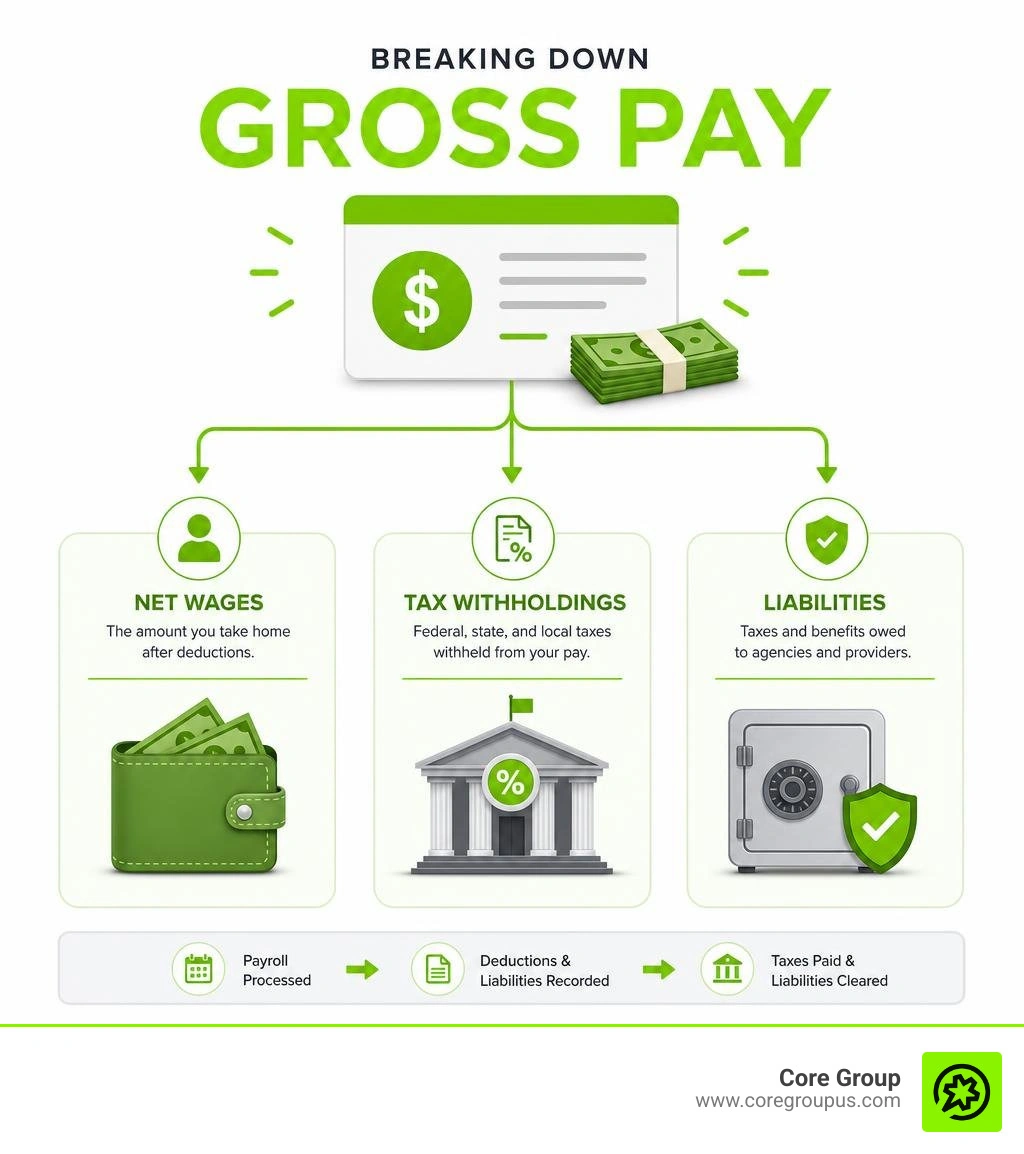
The true test of a great payroll integration with QuickBooks is how cleanly it manages tax withholdings and employer burdens. Payroll tax calculations involve two distinct categories, employee-funded withholdings (federal income tax, social security, medicare, state taxes) and employer-funded expenses (matching FICA, federal and state unemployment taxes).
When payroll executes, employee withholdings are deducted from gross pay and held in liability accounts until remitted to tax agencies like the IRS or state departments of revenue. Modern integrated platforms auto-post these items to individual liability accounts. When tax funds leave your bank account, QuickBooks offsets those specific liability balances down to zero.
If payroll adjustments occur later due to bonus recalculations or voided checks, top-tier integrated tools avoid deleting historical entries. Instead, they generate automated reversal journal entries to preserve a pristine accounting audit trail. For detailed compliance strategies, see our guide on Payroll Tax Compliance.
Troubleshooting Sync Errors and Data Security Best Practices
Even stable cloud systems encounter sync hiccups occasionally. Understanding why data stops flowing helps you fix issues quickly without risking balance sheet errors.
The most common culprit behind a failed payroll sync is an unmapped general ledger account. If you add a new pay item in your payroll system (such as a cell phone stipend or gym reimbursement) without assigning it a matching QuickBooks expense account, the system halts the sync payload to prevent unclassified entries.
Security protocol updates can also pause syncs. OAuth access tokens between software systems expire periodically for safety. When this happens, re-authenticating as Primary Admin refreshes the connection link instantly.
To safeguard sensitive worker compensation data, reliable integrations employ strict defense standards
- Encrypting all data moving across the web using TLS 1.2 protocols
- Securing static accounting records with AES 256-bit encryption at rest
- Requiring annual partner security reviews mandated by Intuit developer standards
- Utilizing offline payload queuing so temporary cloud connection outages never lose transaction entries
Frequently Asked Questions about QuickBooks Payroll Integration
How does cash based accounting differ from accrual based posting in QuickBooks?
The distinction lies in when transactions hit your financial reports. Under cash-based accounting, payroll journal entries post using the actual check date (the day cash leaves your business bank account). This matches your bank feed timing perfectly.
Under accrual-based accounting, wage expenses post using the pay period end date (the period when employees actually performed the work), regardless of when paychecks clear. Most integration tools allow you to toggle between Check Date and Pay Period End Date during setup to match your business accounting policy.
What causes payroll sync errors in QuickBooks and how are they resolved?
Payroll sync errors usually stem from unmapped earning or deduction categories, expired OAuth authorization tokens, changed pay schedules, or closed accounting periods in QuickBooks.
To resolve these errors, check your integration sync log, map any new or unassigned pay codes to valid ledger accounts, re-authorize your QuickBooks admin connection, and ensure your accounting lock date isn't blocking historical postings.
Can external compliance and retirement solutions sync with QuickBooks?
Yes. Dedicated retirement clearinghouses, state-mandated IRA portals, and certified reporting tools can sync directly alongside QuickBooks Online. Integrated platforms handle deduction reporting automatically, updating employee contribution percentages and sending wage files seamlessly.
For state-specific tax portal protocols and requirements, you can check official agency guidelines via Access state agency websites for payroll in QuickBooks ... - Intuit.
Conclusion
A well-configured payroll integration with QuickBooks turns routine payroll from a weekly administrative chore into an automated, error-free financial workflow. By letting specialized systems pass data directly into your ledger, you gain accurate labor cost data, hassle-free tax tracking, and predictable bank reconciliations.
At Core Group, we provide high-touch financial management, bookkeeping, and tax planning specifically designed for creative entrepreneurs. We take the stress out of complex business finances through our simple, no-fluff, profit-first playbook that guarantees real peace of mind and saves you valuable time. We back our commitment to your business efficiency with our signature MacBook Pro guarantee so you can stay focused on building what you love.
Ready to simplify your business accounting, streamline your labor management, and take full control of your numbers? Explore our comprehensive Payroll Services Small Business Guide 2026 or connect with our team at Core Group today.