How to Setup an S-Corp in QuickBooks, Even if You've Never Tried It Before
How to Set Up an S-Corp in QuickBooks Online. Initial Company Settings
To set up an S-Corp in QuickBooks Online, sign in as an administrator, click the Gear icon in the top right corner, and select Account and Settings. From the left menu, choose Company, then click the Legal info card. Under the Business type field, change your designation to S-Corporation and click Save. This aligns your accounting software with your IRS tax classification. If you recently formed a brand new entity or converted an existing limited liability company into an S corporation, your underlying file settings must reflect this structure. When entrepreneurs begin understanding S corporations, they quickly learn that an S-Corp is not an entity type created at the state level. It is a federal tax election made with the IRS using Form 2553.
Updating this dropdown menu tells QuickBooks how to organize default tax lines and map your financial records for year-end tax returns. You do not need to create a completely new QuickBooks Online account or discard your prior transaction history. Your business keeps its existing Employer Identification Number, bank feeds, customer records, and vendor lists.
Changing your business type in QuickBooks does not file tax paperwork with the government. For a tax year beginning January 1, 2026, the standard deadline to submit IRS Form 2553 was March 16, 2026. If you missed that deadline, you can still file under Revenue Procedure 2013-30 for late election relief within three years and 75 days of your target effective date, provided you show reasonable cause for the delay.
Selecting the Right QuickBooks Version and Tax Form
Choosing the appropriate software tier ensures your business can handle required corporate compliance. QuickBooks Online Plus and QuickBooks Online Essentials both support the core accounting requirements of an S-Corp, including mileage tracking, recurring transactions, and bank reconciliations. QuickBooks Online Plus provides additional depth through class tracking and location tracking, which proves helpful if you manage multiple creative projects, business divisions, or corporate officers.
QuickBooks Self-Employed should not be used for an S-Corp. That entry-level version is designed exclusively for sole proprietors filing Schedule C. It does not provide a balance sheet, equity tracking, or integrated payroll tools for owner-officers.
When configured correctly, QuickBooks Online maps your chart of accounts directly to IRS Form 1120-S. This federal tax return is filed annually by S corporations to report income, deductions, and tax credits. Converting an LLC to an S-Corp adds between $1,400 and $4,800 annually in administrative costs, such as corporate tax return preparation and automated payroll processing. However, when your net profits cross $60,000 to $80,000, the resulting self-employment tax savings outpace these overhead fees.
Configuring Your S-Corp Chart of Accounts in QuickBooks
Your chart of accounts forms the backbone of your accounting system. It determines how every dollar flows through your balance sheet and income statement. Maintaining clean books requires professional bookkeeping and financial accounting practices so your business records remain clear and audit-ready throughout the year.
An S-Corp chart of accounts differs significantly from a sole proprietorship. In a sole proprietorship, profits simply flow directly to the owner through informal equity draws. An S-Corp requires clear separation between business assets, short-term liabilities, operating expenses, officer wages, and corporate equity accounts.
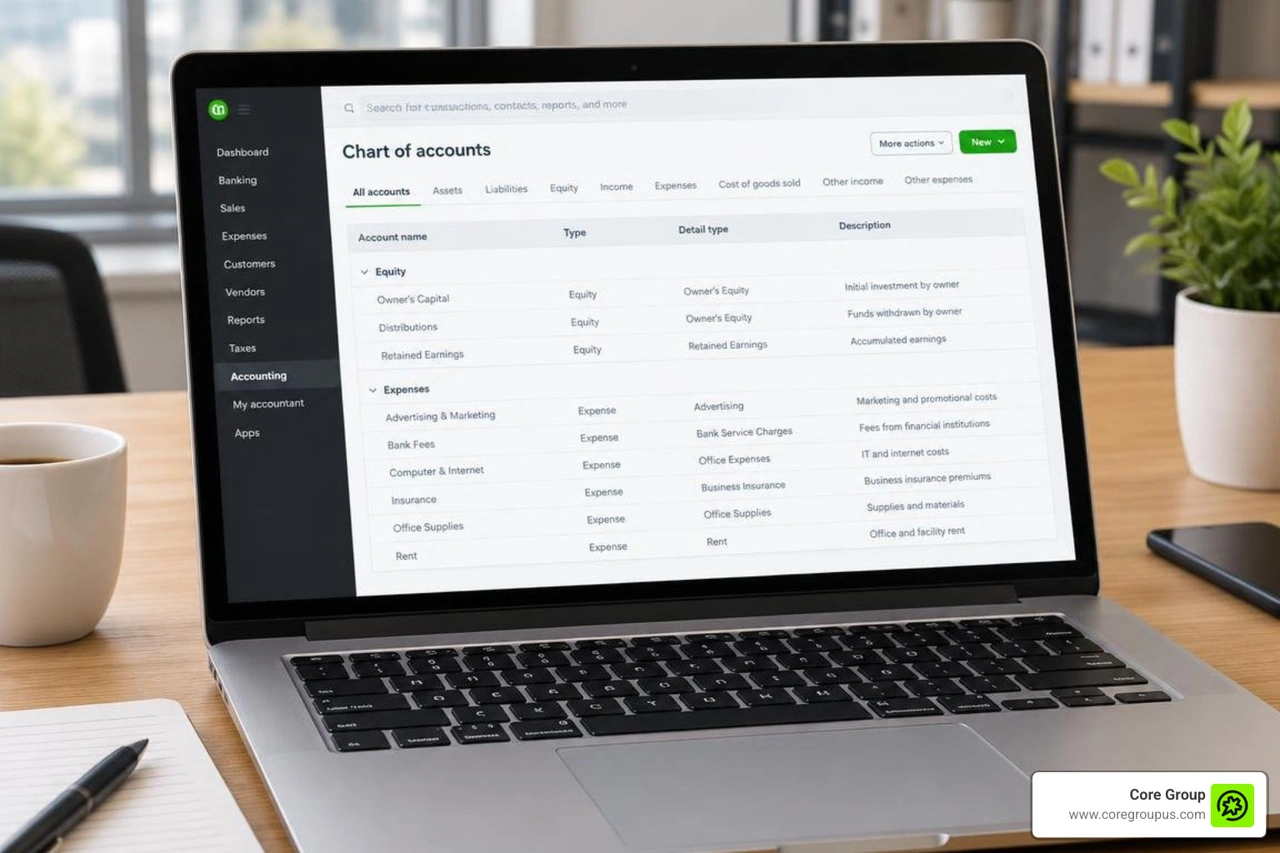
Structuring Income and Operating Expense Accounts
Every invoice paid by your clients must flow into dedicated operating income accounts before moving anywhere else. Never route revenue directly to an equity account. Operating revenue goes to the top of your Profit and Loss statement, where legitimate business expenses offset it.
Your expense categories should clearly capture essential S Corp business deductions such as software subscriptions, advertising, professional legal fees, travel, office supplies, and equipment depreciation.
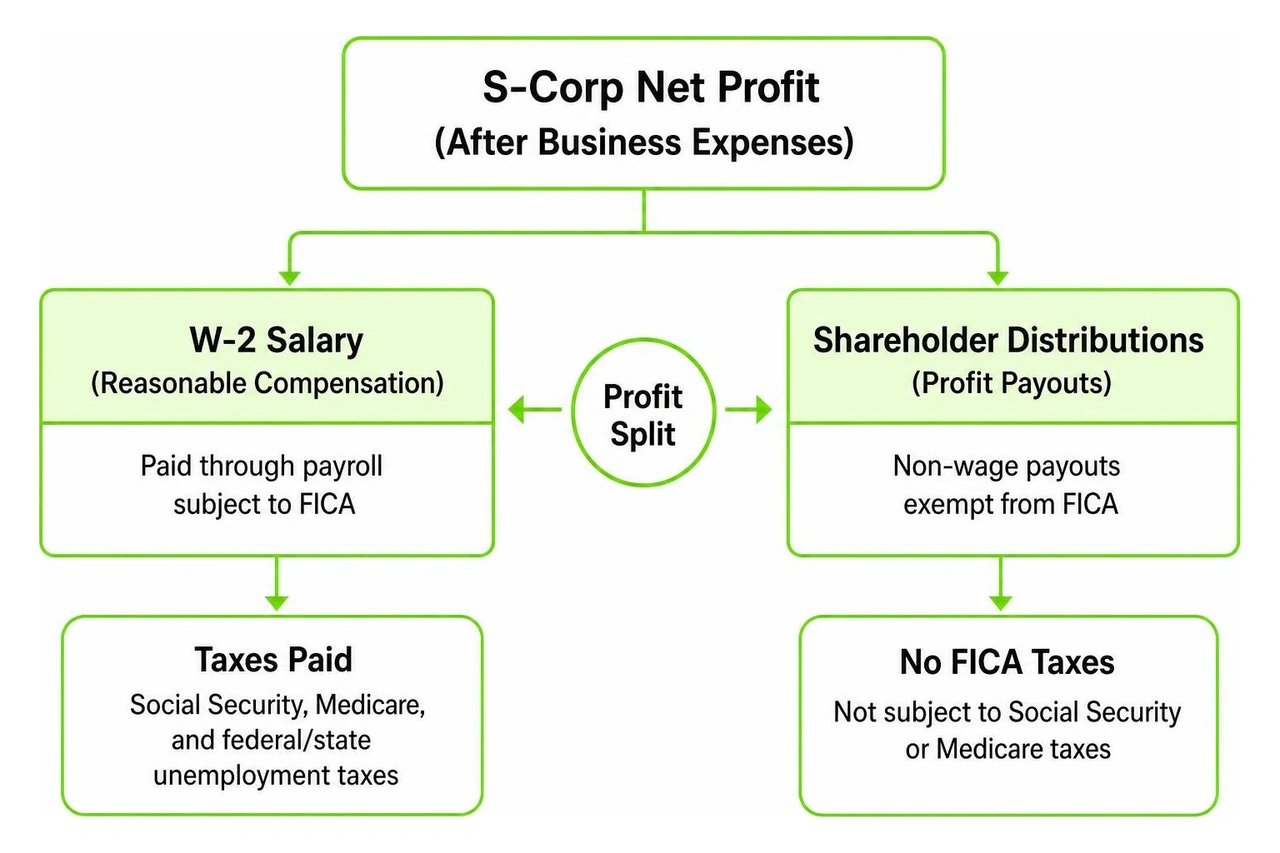
You must also establish two distinct payroll-related expense accounts. Officer Compensation tracks W-2 gross wages paid to corporate owners. Payroll Tax Expense tracks the employer portion of Social Security, Medicare, and federal or state unemployment taxes.
Separating officer compensation from regular employee wages simplifies corporate tax preparation, because Form 1120-S requires owner salaries to be reported on their own dedicated line item.
Creating Shareholder Equity Accounts for Distributions and Capital
The equity section of your balance sheet tracks owner investments, retained profits, and non-wage cash payouts. An S-Corp requires specific equity sub-accounts to track basis accurately.
In your QuickBooks chart of accounts, create the following equity structure.
- Common Stock (the original capital used to fund the corporation)
- Shareholder Capital Contributions (money the owner injects into the business from personal funds)
- Shareholder Distributions (non-wage profit payouts taken by owners)
- Retained Earnings (cumulative net profits from prior years that remain in the company)
If your business has multiple owners, create dedicated sub-accounts for each individual shareholder, such as Shareholder Capital - Owner A and Shareholder Distribution - Owner A. Tracking individual payouts ensures you maintain accurate records when managing S Corp profit distribution across all business partners.
Managing S-Corp Payroll, Reasonable Salary, and Owner Health Insurance
Under IRS regulations, shareholder-employees who provide substantial services to an S-Corp cannot simply take tax-free profit draws. You must receive reasonable compensation paid through a regular W-2 payroll system.

Understanding IRS S Corp payroll rules protects your corporate shield and keeps you in good standing with tax authorities. Self-employment tax sits at 15.3% on net earnings below the Social Security wage base, which is set at $184,500 for the 2026 tax year. By dividing your total net profit between W-2 salary and shareholder distributions, you only pay FICA taxes on the wage portion.
For instance, if your business generates $90,000 in net profit and you pay yourself a reasonable market salary of $50,000, you save approximately $6,120 in Social Security and Medicare taxes on the remaining $40,000 distribution before administrative expenses.
Using automated payroll integration with QuickBooks lets you schedule regular salary runs, automate tax impounds, and generate quarterly federal Form 941 reports smoothly.
How to Setup a S-Corp in QuickBooks Online for Officer Compensation
Setting up your payroll profile correctly ensures your salary posts to the right general ledger accounts. If you are learning how to set up an S-corp in QuickBooks Online for officer compensation, follow our step-by-step S Corp payroll setup guide for 2026 to configure your officer pay types correctly.
- Go to the Payroll menu and select Employees.
- Add yourself as an employee, entering your personal contact information, Social Security number, and Form W-4 tax withholding selections.
- Under the employment details section, designate your worker status as an Officer or Owner-Employee.
- Set your pay schedule (such as monthly or bi-weekly) and enter your annualized salary rate.
- In your payroll accounting preferences, map your gross officer pay directly to the Officer Compensation expense account and company payroll taxes to Payroll Tax Expense.
When you run payroll, QuickBooks calculates employee federal and state withholdings, remits payroll taxes automatically, and posts the transaction across your expense and bank accounts.
Setting Up Greater Than 2% Shareholder Health Insurance in QuickBooks Workforce
Health insurance premiums paid on behalf of a greater-than-2% shareholder must follow strict IRS guidelines. You cannot deduct these premiums as standard employee benefits or take them as tax-free perks. Instead, the cost of the health insurance must be added to your taxable gross wages on Form W-2 Box 1, while remaining exempt from Social Security and Medicare taxes. You can then take an above-the-line deduction for S Corp health insurance deductions on your personal Form 1040 return.
To configure this properly in QuickBooks Workforce, follow these steps.
- Navigate to Payroll, select Employees, and click on your officer profile.
- In the Pay section, select Edit, then scroll to Additional pay types.
- Check the box for S-Corp Owners Health Insurance.
- Enter the recurring premium amount paid each pay period or set an annual limit.
- Save your changes.
When you process payroll, QuickBooks includes this premium amount in taxable federal income, reports it on Form W-2 in Box 14 for year-end tracking, and keeps your wage reporting fully compliant with IRS Notice 2008-1.
You can review additional setup details through Intuit support on how to set up an S-corp medical payroll item for your corporate officers.
Recording Profit Distributions and Tracking Year-End Tax Reports
Once you have satisfied your reasonable salary requirements, remaining business profits can be distributed to shareholders without incurring self-employment taxes. These payouts are balance sheet transactions that reduce equity; they are not tax-deductible operating expenses.
| Feature | Owner Draw (Sole Proprietorship) | S-Corp Distribution |
|---|---|---|
| Applicable Business Entity | Sole Proprietor, Single-Member LLC | S Corporation, LLC taxed as S-Corp |
| Impact on Profit and Loss | No impact | No impact |
| Payroll Tax Implications | Subject to 15.3% Self-Employment Tax | Exempt from FICA/Self-Employment Tax |
| Legal Requirements | Can be taken at any time in any amount | Must be strictly proportional to ownership |
| Target General Ledger Account | Owner Equity / Draws | Shareholder Distribution Equity |
To record a shareholder distribution check in QuickBooks Online, follow these steps.
- Click the + New button and select Check or Expense.
- Choose your business checking account as the source of funds.
- Select the shareholder name as the payee.
- In the Category details section, select Shareholder Distributions (Equity).
- Enter the distribution amount and add a descriptive memo noting the ownership share and distribution period.
- Save and close the transaction.
How to Set Up an S-Corp in QuickBooks Online to Run Accurate P&L and K-1 Reports
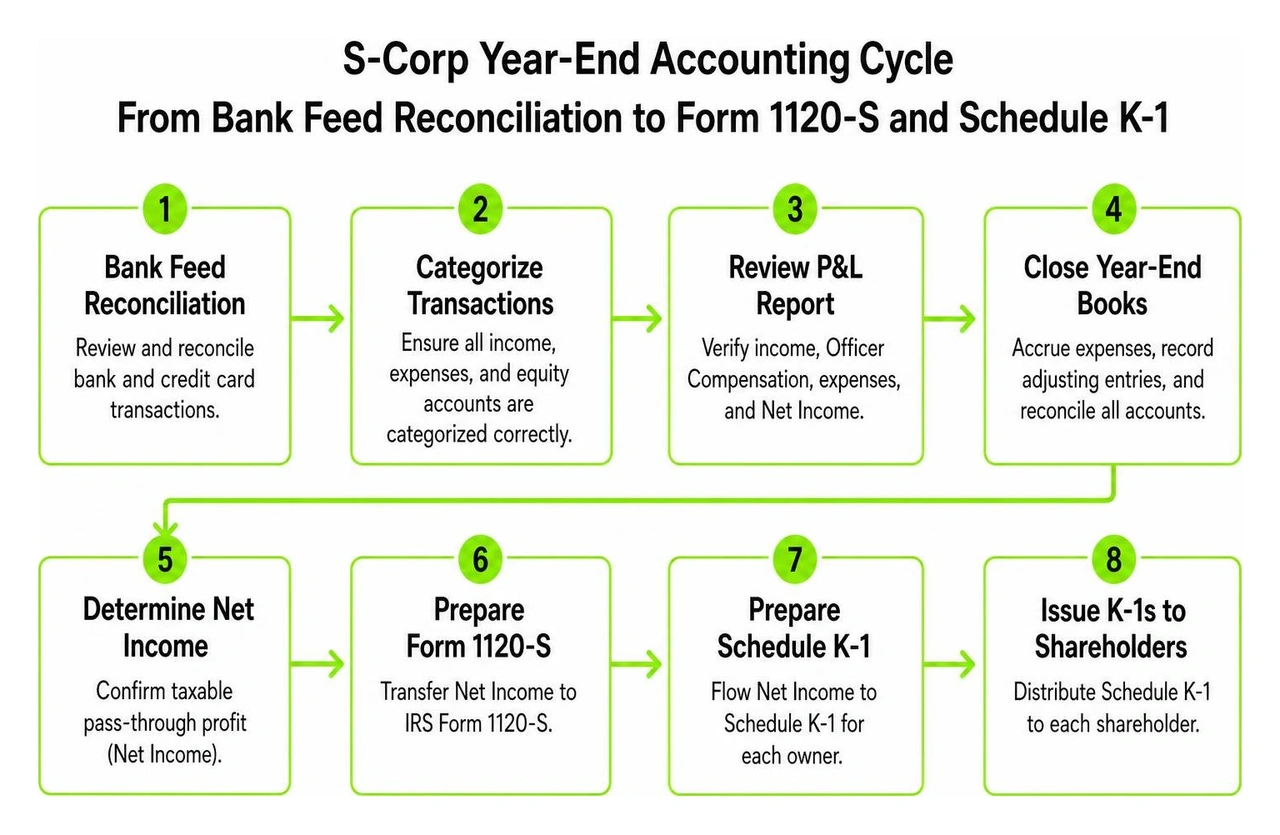
A major benefit of proper bookkeeping is the ability to generate clean financial reports that simplify year-end tax returns. When preparing for corporate filings, you must understand how navigating S Corp business taxes shapes your profit reporting.
To review your true operating results in QuickBooks Online, follow these steps.
- Go to Reports and open the Profit and Loss statement.
- Set the reporting period to the current tax year and select Accrual or Cash basis, matching your tax return method.
- Verify that all client revenue appears in the income section.
- Confirm that your Officer Compensation and operating expenses reduce your gross income.
- Review your bottom-line Net Income.
Your Profit and Loss net income represents the taxable pass-through profit of the S corporation. This figure transfers to IRS Form 1120-S and flows onto Schedule K-1 for each owner. Reviewing our year-end S Corp tax planning guide for 2026 will help you make timely adjustments before closing your annual books.
Common Bookkeeping Mistakes and Audit-Proofing Best Practices
Bookkeeping errors can jeopardize your tax status and invite IRS scrutiny. Avoid these common mistakes when managing your corporate books.
- Recording Distributions as Expenses. Never categorize profit distributions as contract labor, consulting fees, or miscellaneous operating costs. Doing so artificially lowers your net income and triggers tax penalties.
- Disproportionate Payouts. In multi-owner companies, distributions must match exact ownership percentages. If Owner A holds 60% of stock and Owner B holds 40%, every distribution must follow this 60/40 ratio. Paying unequal distributions violates the single class of stock requirement, which can cause the IRS to revoke your S-Corp status.
- Taking Distributions Without Positive Basis. You can only take tax-free distributions up to your stock basis (your cumulative capital contributions plus retained profits, minus prior losses and distributions). Distributions taken beyond your basis are taxed as capital gains.
- Commingling Personal Funds. Paying personal credit cards directly from company accounts muddies your general ledger. If personal funds are used for business, record them as shareholder loans or capital contributions.
To maintain audit-ready books, attach written board minutes or formal shareholder consents to every significant distribution entry in QuickBooks. Many creative founders find that relying on professional S Corp bookkeeping provides peace of mind while freeing up time to focus on business growth.
Frequently Asked Questions About S-Corp Setup in QuickBooks
What is the difference between an Owner's Draw and an S-Corp Distribution in QuickBooks?
An owner draw is used by sole proprietorships and default single-member LLCs to withdraw funds. These draws represent personal withdrawals from an unincorporated business, and all underlying net profit remains subject to the standard 15.3% self-employment tax. An S-Corp distribution is a formal dividend of pass-through profits paid to a corporate shareholder. S-Corp distributions are exempt from payroll taxes and must be supported by adequate shareholder stock basis.
Can I change an existing LLC company file to an S-Corp without starting over in QuickBooks?
Yes. You do not need to create a new company file or migrate your historical transactions. Navigate to Account and Settings, choose the Company tab, click Legal info, and update your business type to S-Corporation. Your existing bank feeds, customer invoices, vendor history, and prior-year reports will remain completely intact.
How do I record health insurance premiums paid directly by the S-Corp owner?
If an owner pays health insurance premiums using personal funds rather than corporate bank accounts, record the payment in QuickBooks through a journal entry. Debit the Officer Health Insurance Expense account and credit Shareholder Capital Contributions. Then, process the premium through your QuickBooks payroll module as an S-Corp Owner Health Insurance fringe benefit to ensure it is correctly reflected on your annual Form W-2 Box 14.
Conclusion
Managing corporate accounting does not have to be stressful or overwhelming. By structuring your initial settings, building a dedicated chart of accounts, automating reasonable salary payroll, and tracking equity distributions correctly, you set your business up for sustainable financial success.
At Core Group, we provide financial management, bookkeeping, and tax services specifically tailored for creative entrepreneurs. We run a no-fluff, profit-first playbook designed to save you time and provide lasting peace of mind, backed by our MacBook Pro guarantee. Whether you are seeking guidance on how to form an S Corp correctly or need help structuring your day-to-day books, our team is here to help you build a clear, profitable financial foundation.