An Essential Guide to Xero Payroll Integrations
Make Payroll Integration with Xero Easier to Reconcile
A payroll integration with Xero sends each completed pay run into your general ledger automatically. To set it up well, connect your payroll platform, map wages, employer taxes, benefits, and net pay to the right Xero accounts, then choose whether to post Bills or Manual Journals. Finally, match the synced entry to the related bank transactions and review it before month-end.
This removes a major source of stress for creative business owners who need clean books but would rather focus on client work. Automated payroll-to-accounting sync can reduce bookkeeping errors by 73% compared with manual entry, while businesses using automation report fewer reconciliation discrepancies.
The goal is simple. Your payroll system handles pay, deductions, and compliance. Xero holds a clear, audit-ready record of the financial impact. With the right account mapping and reconciliation process, payroll no longer becomes a spreadsheet project after every pay run.
I'm Christian Brim, and I help creative entrepreneurs build financial workflows that make the numbers clearer and the work feel lighter.

Basic payroll integration with Xero resources
Introduction
Managing finances for a growing business comes with plenty of moving parts, but manual payroll reconciliation should not be one of them. Research shows that 52% of SMBs reconcile payroll manually between accounting and payroll platforms. That manual process eats up hours of valuable creative energy. On average, automated payroll syncing saves 2.1 bookkeeper hours per pay run and drives 67% fewer reconciliation discrepancies per quarter.
Using modern cloud accounting tools like Xero allows your business to create audit-ready financial records without the headache of manual data entry. Whether you run a bustling design agency or an independent production studio, connecting your payroll platform directly to Xero provides the accuracy you need to scale. For US businesses exploring core features, Payroll Software for Small Businesses offers foundational capabilities that pair seamlessly with your general ledger.
How to Configure a Payroll Integration with Xero
Setting up your integration correctly from the start protects your financial reporting down the line. The configuration process establishes a secure bridge between your payroll provider and your Xero chart of accounts. When a pay run completes, your payroll system packages gross wages, taxes, withholdings, and net distributions into structured financial data and sends it directly to Xero.
To begin, you will authenticate the connection using OAuth 2.0 protocols inside your payroll software app directory. You will need administrative permissions in both systems to authorize the sync. Once connected, you will configure transaction preferences, specify entry dates such as the pay check date or debit date, and establish automated journal creation rules.
Manual Journals vs Bills for Payroll Integration with Xero
When configuring how payroll data posts into Xero, you must choose between two architectural methods, Manual Journals or Accounts Payable Bills. Both methods record the financial impact of payroll accurately, but they handle reconciliation and reporting details differently.
| Feature | Manual Journals | Accounts Payable Bills |
|---|---|---|
| Transaction Type | General Ledger Journal Entry | Accounts Payable (ACCPAY) Invoice |
| Presentation | Standard Debits and Credits | Supplier Bill Layout |
| Contact Mapping | Aggregated Summary Data | Individual Employee Contact Breakdown |
| Reconciliation Method | Direct Clearing Account Matching | Find and Match Split Function |
| Best Suited For | Consolidated Payroll Summaries | Detailed Vendor and Line Item Tracking |
Manual Journals post debits and credits directly across your wage expense and liability accounts. If you use manual journals, you must map net wages to a dedicated Current Liability clearing account with payments enabled, such as Wages Payable. You can explore complete setup strategies in our online payroll guide small business 2026.
Accounts Payable Bills translate debits into positive line amounts and credits into negative line amounts, with total net pay representing the overall payable balance. Bills allow you to associate specific pay items with employee contact profiles, offering an intuitive bill payment workflow for business owners who prefer working within the Purchases dashboard.
Default and Detailed General Ledger Account Mapping

Accurate account mapping ensures every payroll dollar lands in the correct spot on your Profit and Loss statement and Balance Sheet. Most payroll systems require both default mappings and detailed category mappings.
Default mappings serve as an essential safety net. When your business introduces a new earning type, bonus structure, or state tax withholding, default mappings automatically assign those new items to designated accounts, preventing sync failures.
Detailed mappings allow you to separate expenses granularly.
- Gross Wages and Salaries mapped to operating expense accounts
- Employer Payroll Taxes mapped directly to tax expense lines
- Benefit Liabilities mapped to balance sheet liability accounts combining employer contributions and employee deductions
- Pre-tax deductions such as commuter benefits mapped to appropriate clearing accounts
To dive deeper into maintaining clean ledgers, explore our payroll bookkeeping complete guide 2026. Always refresh your chart of accounts within your payroll platform immediately after adding new accounts inside Xero to keep everything in sync.
Reconciling Synced Payroll Transactions and Bank Feeds
Once your pay run syncs to Xero, the final step is reconciling the transactions against your live bank feed. Depending on your payroll provider, you may see multiple withdrawals hitting your bank feed on pay day, such as one debit for direct deposits, one for payroll taxes, and one for processing fees.
Matching these entries promptly ensures your balance sheet reflects true cash positions and zeros out clearing accounts. For complete support across day to day bookkeeping workflows, our bookkeeping services complete guide provides practical frameworks to streamline month end closing.
Reconciling Split Direct Deposit Debits Against Payroll Bills
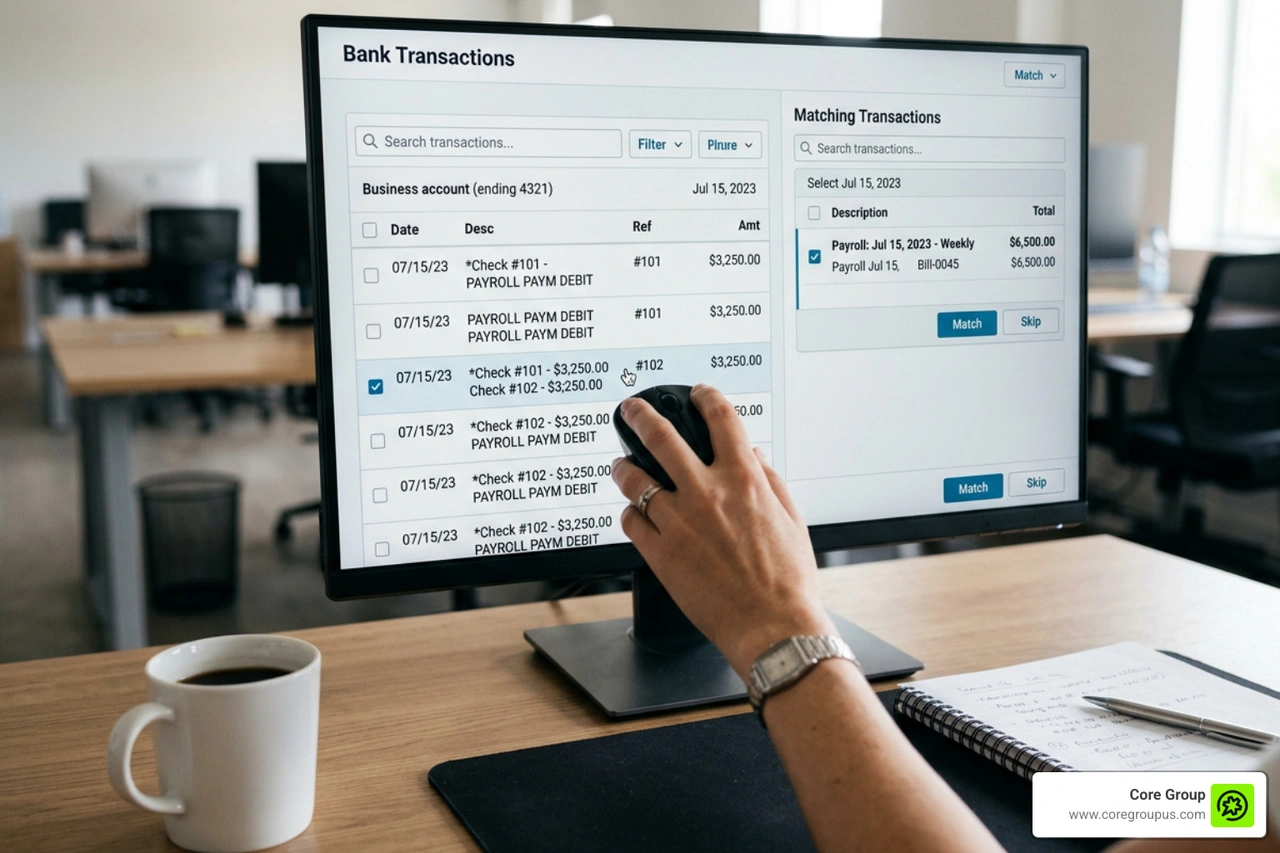
When payroll posts as a single consolidated Accounts Payable Bill, reconciling it against separate bank feed debits requires Xero's Find and Match tool.

Follow these steps to clear the bill.
- Navigate to the Bank Reconciliation screen for your operational checking account.
- Locate the first payroll debit transaction representing employee direct deposits.
- Select Find and Match on the right side of the screen.
- Search for the synced payroll bill and select the checkbox next to it.
- Click the Split link that appears next to the bill total.
- Enter the amount of the first debit to apply a partial payment against the bill.
- Click Reconcile to match the first portion.
- When the second debit for tax remittance appears, repeat the process to match and fully clear the remaining balance on the bill.
Handling disbursements smoothly is critical for clean ledgers, and understanding how payroll direct deposit interacts with bank feeds keeps your cash flow clear.
Troubleshooting Common Errors in Payroll Integration with Xero
Even with careful configuration, integration errors can occur when data structures fall out of alignment. Here are common sync issues and how to fix them quickly.
- Unmapped Chart of Accounts Codes. Syncs fail when a new payroll category has no corresponding Xero account. Navigate to integration settings, refresh the chart of accounts, and assign the unmapped line item to resolve it.
- Email Mismatches. Systems matching timesheet data to employee records require exact email alignment. Ensure employee profiles in both systems share identical primary or secondary email addresses.
- Expired OAuth Tokens. API access tokens expire periodically for security. If automated syncs halt, disconnect and reauthorize the integration within your payroll settings.
- Inactive Accounts. If an account code was archived or deleted in Xero, the payroll sync will reject the entry. Restore the account or update the mapping to an active account code.
- Reversing Corrections. When payroll voids or corrections occur, modern platforms issue reversal entries with negative values. Ensure your integration settings allow draft journal edits to let correcting entries post cleanly.
Maintaining accurate tax mappings is essential for overall payroll tax compliance, preventing costly adjustments at year end.
Advanced Allocation and Multi-Entity Tracking Options
As creative businesses expand, labor cost allocation becomes vital for measuring project profitability. Advanced payroll integrations support multi-dimensional reporting, letting you track financial performance without cluttering your general ledger with hundreds of separate account codes. For companies with operations across borders, tools like Payroll Software for Small Business | Xero UK illustrate how regional compliance rules integrate into core accounting ledgers.
Departmental Tracking Categories and Project Costing
Xero uses Tracking Categories to segment financial data by department, location, or cost center. When integrated with payroll, you can assign earnings categories to specific departments such as Design, Marketing, or Production.
This structure allows wage expenses, employer taxes, and benefit costs to flow into departmental Profit and Loss statements automatically. Tracking labor costs effectively ties directly into robust payroll management in HR and helps management analyze the true total cost of compensation alongside payroll and benefits.
Contractor Payments and International Payroll Handling
Managing non-employee compensation requires a distinct workflow from regular W-2 payroll. Contractor disbursements are mapped directly to independent contractor expense accounts rather than gross wage accounts.
When managing high volumes of contractor payouts, batching payments into a single consolidated journal entry keeps your general ledger clean while maintaining individual transaction logs inside the payroll platform. For creative agencies hiring distributed international talent, global workforce platforms can disburse funds across multiple currencies while syncing structured, single currency journal entries back to Xero. Maintaining clear cross-border records ensures ongoing payroll compliance for remote teams.
Frequently Asked Questions About Xero Payroll Workflows
Can I update account mappings and resync historical pay runs?
Yes. If you discover an incorrect mapping or update your chart of accounts structure, you can update the mappings in your payroll software and manually trigger a resync for past pay runs. If the original journal in Xero is in Draft status, the resync overwrites it with corrected data. If the journal or bill was already approved, you may need to void the original entry before resyncing. Even if you run small business payroll for one employee, keeping historical data accurate ensures reliable comparative financial reports.
Why do employer taxes only require an expense account?
When using full-service payroll providers that automatically calculate, withdraw, and remit payroll taxes directly to federal and state agencies on your pay date, you do not need to maintain an ongoing payroll tax liability account on your balance sheet. The tax amount represents an immediate cash outflow and business expense, allowing you to map employer taxes directly to an Employer Tax Expense account. This streamlined approach simplifies general ledger maintenance for payroll for SMB operations.
How do contractor payments differ from employee payroll syncs?
Employee payroll syncs must capture complex multi-line entries including gross wages, tax withholdings, employer benefit contributions, and net pay liabilities. In contrast, contractor syncs represent straightforward business disbursements. Contractor payouts post either as individual supplier bills or consolidated journal entries mapped to 1099 contractor expense accounts without tax withholdings. This keeps accounting straightforward, particularly for micro business payroll environments managing agile freelance teams.
Conclusion
Building an efficient financial foundation gives creative entrepreneurs the freedom to do what they do best without getting bogged down by administrative complexity. Connecting your payroll software to Xero turns a stressful, error-prone chore into a smooth, automated background workflow that keeps your numbers accurate and audit-ready.
At Core Group, we provide financial management, bookkeeping, and tax services specifically tailored for creative entrepreneurs. Our no-fluff, profit-first playbook guarantees peace of mind and saves you valuable time, all backed by our MacBook Pro guarantee. If you are ready to streamline your payroll workflows and take control of your financial clarity, explore our comprehensive payroll services small business guide 2026 and let our team help you build a financial system that works for you.